
Azure AD B2C Custom Policy Architecture is the foundation for building advanced, enterprise-grade identity experiences beyond standard user flows. It allows architects and developers to fully control authentication, token issuance, claims transformation, MFA, and identity provider integrations using OAuth 2.0 and OpenID Connect standards. This guide explains how Azure AD B2C custom policies work under the hood and how all core components fit together.
What Are Azure AD B2C Custom Policies?
Azure AD B2C custom policies are XML-based trust frameworks that define:
- How users sign up or sign in
- Which identity providers are used
- How MFA is enforced
- How claims are collected, transformed, and sent to applications
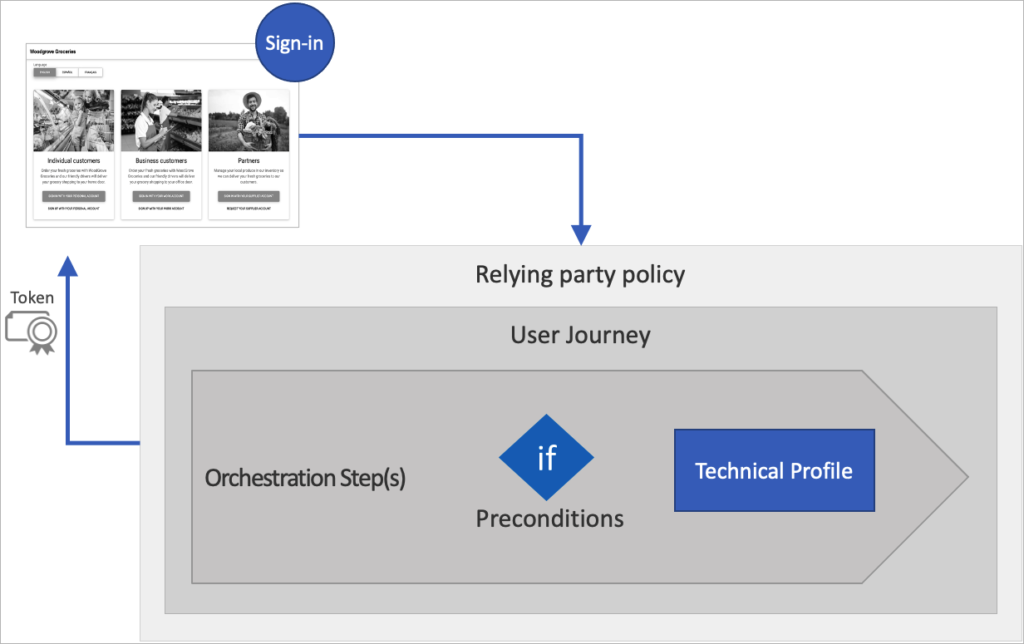
Microsoft calls this the Identity Experience Framework (IEF)
🔗 Learn more:
https://learn.microsoft.com/azure/active-directory-b2c/custom-policy-overview
Think of a custom policy as an identity workflow engine.
High-Level Architecture
Here’s how authentication flows when using a custom policy:
User → Azure AD B2C Policy → Identity Providers → Claims Processing → Token Issuance → ApplicationUnderstanding Azure AD B2C custom policy architecture helps teams design flexible identity journeys that support complex enterprise requirements.
Main Building Blocks
| Component | Purpose |
|---|---|
| Claims | Data about the user (email, name, roles, etc.) |
| Technical Profiles | Connections to systems (local accounts, social IDPs, REST APIs, MFA providers) |
| User Journeys | Step-by-step authentication flows |
| Orchestration Steps | Individual steps inside a journey |
| Relying Party Policy | The policy your application calls |
Technical deep dive:
https://learn.microsoft.com/azure/active-directory-b2c/trustframeworkpolicy
OAuth 2.0 and OpenID Connect in B2C
Azure AD B2C works as an OAuth 2.0 Authorization Server and an OpenID Connect Identity Provider.
Your app redirects users to B2C using endpoints like:
/oauth2/v2.0/authorize
/oauth2/v2.0/token
Supported flows include:
- Authorization Code Flow (recommended)
- PKCE for mobile/SPAs
🔗 Protocol details:
https://learn.microsoft.com/azure/active-directory-b2c/openid-connect
Understanding Tokens in Azure AD B2C
After authentication, B2C issues JWT (JSON Web Tokens).
1️⃣ ID Token
Used by the application to identify the user.
Contains:
- Name
- Object ID
- Custom claims
🔗 ID token reference:
https://learn.microsoft.com/azure/active-directory-b2c/id-token
2️⃣ Access Token
Used to call secured APIs.
Contains:
- Scopes
- Roles
- Permissions
🔗 Access token reference:
https://learn.microsoft.com/azure/active-directory-b2c/access-tokens
3️⃣ Refresh Token
Used to obtain new tokens without forcing the user to sign in again.
🔗 Token lifecycle:
https://learn.microsoft.com/azure/active-directory-b2c/tokens-overview
Within the Azure AD B2C custom policy architecture, tokens are issued after claims are collected, transformed, and validated across orchestration steps.
Local Identity Provider (Email/Password Accounts)
Azure AD B2C can act as its own identity provider.
When users sign in with email and password:
- A self-asserted technical profile collects credentials
- The SignInUser technical profile validates them
- User attributes are read from the directory
- Claims move to the next orchestration step
This is all defined inside the custom policy — no backend code needed.
🔗 Local account technical profile:
https://learn.microsoft.com/azure/active-directory-b2c/local-accounts
Multi-Factor Authentication (MFA)
Custom policies allow you to enforce MFA using phone verification.
MFA Flow Inside a Policy
- A claims transformation creates a unique MFA user ID
- Azure B2C sends a verification code via SMS or call
- User enters the code
- Verified phone number becomes a claim
This is handled using the PhoneFactor technical profile.
🔗 MFA in custom policies:
https://learn.microsoft.com/azure/active-directory-b2c/multi-factor-authentication
Claims: The Heart of Custom Policies
Claims are data containers that travel through the policy.
Examples:
emaildisplayNameextension_loyaltyIdisMfaRegistered
Claims are:
✔ Collected from users
✔ Read from identity providers
✔ Sent to APIs
✔ Added to tokens
🔗 Claims schema:
https://learn.microsoft.com/azure/active-directory-b2c/claimsschema
Claims Transformations
Claims transformations are like functions inside your policy. They let you:
- Combine values
- Change case
- Compare values
- Generate GUIDs
- Format strings
Example uses:
- Create a username from email
- Generate MFA session IDs
- Check if user accepted latest T&C
🔗 Claims transformations reference:
https://learn.microsoft.com/azure/active-directory-b2c/claimstransformations
User Journeys & Orchestration Steps
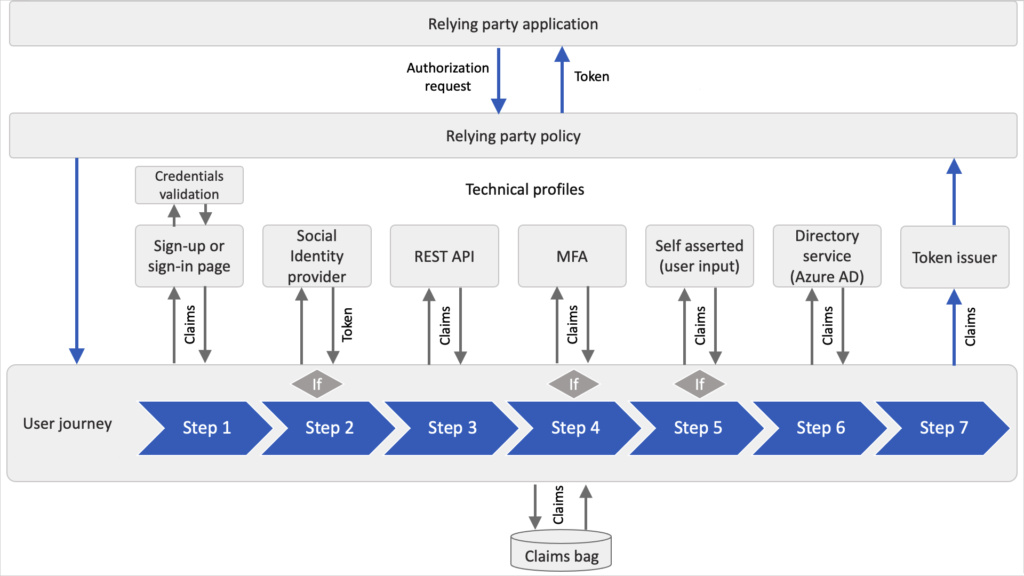
A User Journey is the full login or signup experience.
Each step is an Orchestration Step, such as:
- Show sign-in page
- Validate credentials
- Call REST API
- Perform MFA
- Issue token
The final step always uses the JWT Issuer technical profile to generate tokens.
🔗 User journeys explained:
https://learn.microsoft.com/azure/active-directory-b2c/userjourneys
Policy File Structure (Trust Framework)
Custom policies are split into multiple files:
| File | Purpose |
|---|---|
| TrustFrameworkBase.xml | Core definitions (do not edit) |
| TrustFrameworkLocalization.xml | UI language content |
| TrustFrameworkExtensions.xml | Your custom logic |
| RelyingParty.xml | Entry point used by applications |
🔗 Policy inheritance model:
https://learn.microsoft.com/azure/active-directory-b2c/custom-policy-get-started
Final Flow Summary
Here’s the big picture:
Application → B2C Custom Policy
      → User Journey
          → Identity Provider (Local/Social)
          → Claims Collection
          → Claims Transformations
          → MFA (Optional)
      → JWT Token Issuance
→ Application Receives ID & Access Tokens
Azure AD B2C custom policies give architects the power to design enterprise identity flows with complete control over security, user experience, and token content.
Mastering Azure AD B2C custom policy architecture gives architects full control over identity flows, security enforcement, and token customization.

Kaustubh Pandey is the creator of Evolora, a technology professional with a strong interest in modern software systems, cloud platforms, and continuous learning.
Evolora was created as a personal knowledge-sharing initiative to document learning, explore new technologies, and present technical concepts in a simple and practical manner.
Through Evolora, the aim is to create helpful, meaningful content that supports learning and understanding in the ever-changing world of technology.
Leave a Reply